FYI for any Googlers out there. I recently bought the wireless dongle for the Xbox One controller (I was using a microUSB cord, but it started to get a bit touchy). It didn't work at first on Windows 7. I got the adapter to be recognized by manually installing a driver, but the controller wasn't recognized. The problem appeared to be that I had Windows Update turned off, therefore didn't get the drivers I needed, even though I downloaded and installed the official drivers individually.
Microsoft was very little help. They don't link directly to driver files anymore, they direct you to their download site (which requires Internet Explorer, ugh) and tell you what to search term to use to find the files. Really Microsoft? A bit rinky-dink isn't it? Also the bulk of their advice was for the Xbox One or Windows 10.

Thursday, January 21, 2016


Saturday, October 3, 2015
Rant time
I decided it would be nice if my last post on Google Drive was published rant-free. It might be the first time I've ever mentioned Google in a post without an accompanying rant. Nah, once upon a time I was pretty enamored with them. I still am, mostly.
And this rant isn't even about Google, it's about smart quotes.
Smart quotes are the default in Google Docs. They convert your "dumb" quotes into "smart" ones. You can turn them off. When writing, I don't like smart quotes. They cause problems when going from one format to another (like when pasting text into an email), and they're completely redundant. I have never, ever, ever, ever, ever seen a single use of quotation marks in which it was not obvious to me whether a particular mark was opening or closing a quotation.
Redundancy is good. Most of grammar is about redundancy. All the really important bits, anyway. Tenses, plural forms, if you know something is incorrect when seeing it in print, then that's the same as saying the broken rule is redundant---or else how could you know how it was wrong? But humans have comprehension and attention problems, so we really want a lot of redundancy into our language. (Another example of good redundancy: the comedic pause, which gives everybody a chance to catch up and be ready for the punchline. And, if it's a good setup, it builds anticipation too. The pause isn't needed in order to send the information of the joke, it merely enhances its reception).
However, I don't think smart quotes' redundancy actually helps anything. If there ever were a strange custom case, like if you wanted to break the mold and do nested quotes, smart quotes are largely automatic in most software, so they still would hinder instead of helping you.
While looking for an argument for smart quotes, I found this web site, Smart Quotes For Smart People, with the goal of telling you that you should be using smart quotes. They also link to tools which can help people use them more easily. It's a cool site and they're not being dicks about their grammatical fashion like some people.
We can pretend in typography (and all design) that there's an objective right and wrong, but there are a lot of things that are simply a matter of taste. There's a lot of deliberate misinformation out there to help "experts" pretend like subjective things are objective, or to pretend like the true purpose of a consensus (even a fabricated one) is to bully people into doing things a particular way. Smart Quotes for Smart People aren't doing any of that. But they also don't give you any reason (that I saw) as to why you should use smart quotes, besides simply saying that you should. They do have pictures of smart quotes and dumb quotes side by side, around phrases. Perhaps they think the aesthetic superiority of their position will be universally self-evident and not require an explanation? Well guess what? I admit it, the smart quotes do look better.
In fact, there's a tool I use in epub creation that changes three hypens (---) into an em-dash (—). I use that a lot. That same function also turns dumb quotes into smart ones. I can't turn it off, it does them both at the same time. I used to resent that. As of this moment, I just became cool with it.
So rant nullified. I still don't think they're necessary 90% of the time. I'm not going to do crazy shortcuts to generate them, I'll let my publishing pipeline handle that. But when fixing text into a permanent, public-facing design or document, yeah, I'll go with smart quotes.
Til then,
David
And this rant isn't even about Google, it's about smart quotes.
Smart quotes are the default in Google Docs. They convert your "dumb" quotes into "smart" ones. You can turn them off. When writing, I don't like smart quotes. They cause problems when going from one format to another (like when pasting text into an email), and they're completely redundant. I have never, ever, ever, ever, ever seen a single use of quotation marks in which it was not obvious to me whether a particular mark was opening or closing a quotation.
Redundancy is good. Most of grammar is about redundancy. All the really important bits, anyway. Tenses, plural forms, if you know something is incorrect when seeing it in print, then that's the same as saying the broken rule is redundant---or else how could you know how it was wrong? But humans have comprehension and attention problems, so we really want a lot of redundancy into our language. (Another example of good redundancy: the comedic pause, which gives everybody a chance to catch up and be ready for the punchline. And, if it's a good setup, it builds anticipation too. The pause isn't needed in order to send the information of the joke, it merely enhances its reception).
However, I don't think smart quotes' redundancy actually helps anything. If there ever were a strange custom case, like if you wanted to break the mold and do nested quotes, smart quotes are largely automatic in most software, so they still would hinder instead of helping you.
While looking for an argument for smart quotes, I found this web site, Smart Quotes For Smart People, with the goal of telling you that you should be using smart quotes. They also link to tools which can help people use them more easily. It's a cool site and they're not being dicks about their grammatical fashion like some people.
We can pretend in typography (and all design) that there's an objective right and wrong, but there are a lot of things that are simply a matter of taste. There's a lot of deliberate misinformation out there to help "experts" pretend like subjective things are objective, or to pretend like the true purpose of a consensus (even a fabricated one) is to bully people into doing things a particular way. Smart Quotes for Smart People aren't doing any of that. But they also don't give you any reason (that I saw) as to why you should use smart quotes, besides simply saying that you should. They do have pictures of smart quotes and dumb quotes side by side, around phrases. Perhaps they think the aesthetic superiority of their position will be universally self-evident and not require an explanation? Well guess what? I admit it, the smart quotes do look better.
In fact, there's a tool I use in epub creation that changes three hypens (---) into an em-dash (—). I use that a lot. That same function also turns dumb quotes into smart ones. I can't turn it off, it does them both at the same time. I used to resent that. As of this moment, I just became cool with it.
So rant nullified. I still don't think they're necessary 90% of the time. I'm not going to do crazy shortcuts to generate them, I'll let my publishing pipeline handle that. But when fixing text into a permanent, public-facing design or document, yeah, I'll go with smart quotes.
Til then,
David
Google Docs Revisited
So I'm finally at a place with a draft after I've made a round of content edits and pasted it into Drive's document editor to check out it's proofreading suggestions. Check this out:
On the other hand, to test whether is was something as stupid as "stands" not being in their dictionary, I typed this:
 As you may or may not know, Fibberhta is not a word. Blogger knows that, it just told me so. I typed "Drianks" and put in a sentence to see if maybe the editor hadn't caught up yet, but it was underlined as incorrect immediately. To further test, I put Fibbherta in a proper sentence:

She smiled, and brushed some loose stands of hair away from her face.The editor caught "stands" in there, and suggested "strands". That's amazing. Stands is a real word, right? Yet by context it somehow knew it was wrong. I'm assuming it's informed by the contextual engine they built for voice recognition?
On the other hand, to test whether is was something as stupid as "stands" not being in their dictionary, I typed this:


So it seems that it needs some context to evaluate a word. Note I made that expanded sentence so it could be presumed that Fibberhta was a proper noun, perhaps someone's strange name, but Docs did still flag it. What does Google suggest instead of Fibberhta? Why "Fibber Hta", of course.
Not perfect, certainly useful and incredibly impressive. If Blogger used this proofreading engine, my blog posts would be way cleaner.
Anyway, just an FYI.
David
Friday, September 11, 2015
Proofreading (and mini-rants) on Google Docs
tl;dr - Google Drive seems to have a pretty good grammar proofreader, possibly good enough to justify pasting drafts in regularly for a quick analysis.
***
So I don't really like Google Drive for many reasons. Mostly because I've tried to use it regularly, and if there's one thing Google's really good at, it's keeping people from using their products in new and interesting ways that the developers didn't plan for. Drive is sort of like a Dropbox clone, and better than Dropbox in a few aspects, but in the core syncing bits it's straight up not as good as Dropbox, not does it want to be, it's inferior by design. It's also a decent office suite, but it brings all the same problems as previous office suites, most notably for me, refusal to create or edit text files without converting them to their own pet format first.
The truth is it's not a big deal. Dropbox exists so I don't have to care how good Drive's sync is (or isn't), and I use text editors to do all my writing in, and the few cloud apps I've used are all generally inferior to native apps (and may always be inferior, do you really want the problems and limitations of streaming music and video to be present in the applications you use? Streaming media saves you space, what does streaming apps save you? Marginal space, and it loses you time. They're great if you're traveling though. Then again, so is a flash drive). My biggest problem with Google is they seem to want to steer progress. Compare that with, say Valve, who still steers but also regularly tosses out their own internal tools and lets their users do what they want with them, and use that to inform their own direction.
Trying to steer progress is fine, it's allowed. But it can result in crusades, like ignoring (or actively reducing) the value of microSD storage on mobile devices, or pushing Plus on people---auto creating accounts for users of other Google services, generally seeming hostile to people who just want email or cloud storage and don't want to become pawns in Google's pissing match with Facebook.
Anyway, the thing I wanted to talk about is editing documents in Google Drive. It's just that the five minutes I spent in Drive testing this feature reminded me of all the terrible problems it has. The interface is slow, unintuitive, extra open tabs all over the place which deleting documents won't close for some reason, instead they take me to a different dashboard than the one I started from. Again, I digress.
The spelling/grammar checking is actually pretty good. Good enough to see the error in "Why don't you tell hi that?" (the correct version would be "Why don't you tell him that") That won't pop up as wrong in any spell checkers, and very few grammar checkers will catch it. I'm checking out a lot of other proofreading software, most of which has me wanting to reach through my computer screen and throttle developers.
It's not perfect, and after a few minutes of testing I discovered a few parts where I thought it was being really clever it turned out it didn't know the difference between the right or wrong way after all. It detects most obvious its/it's issues, but it's surely no substitute for an actual human proofreader.
Just the same, I was impressed by it, I'll probably run near-final drafts through it in the future just to see what it picks up.
And btw, it doesn't underline errors in green, but in red, so at first glance it may look like it's not working. And as I said, it does miss some things. But it caught a few tiny errors for me that I may never have caught on my own, thanks to my darned pattern-completing eyes and brain.
Funny side note, I can report that Drive's spell/grammar checker is not present in Blogger, after seeing how it treats the example error which Drive does catch.
Anyway, that's my piece.
-David
***
So I don't really like Google Drive for many reasons. Mostly because I've tried to use it regularly, and if there's one thing Google's really good at, it's keeping people from using their products in new and interesting ways that the developers didn't plan for. Drive is sort of like a Dropbox clone, and better than Dropbox in a few aspects, but in the core syncing bits it's straight up not as good as Dropbox, not does it want to be, it's inferior by design. It's also a decent office suite, but it brings all the same problems as previous office suites, most notably for me, refusal to create or edit text files without converting them to their own pet format first.
The truth is it's not a big deal. Dropbox exists so I don't have to care how good Drive's sync is (or isn't), and I use text editors to do all my writing in, and the few cloud apps I've used are all generally inferior to native apps (and may always be inferior, do you really want the problems and limitations of streaming music and video to be present in the applications you use? Streaming media saves you space, what does streaming apps save you? Marginal space, and it loses you time. They're great if you're traveling though. Then again, so is a flash drive). My biggest problem with Google is they seem to want to steer progress. Compare that with, say Valve, who still steers but also regularly tosses out their own internal tools and lets their users do what they want with them, and use that to inform their own direction.
Trying to steer progress is fine, it's allowed. But it can result in crusades, like ignoring (or actively reducing) the value of microSD storage on mobile devices, or pushing Plus on people---auto creating accounts for users of other Google services, generally seeming hostile to people who just want email or cloud storage and don't want to become pawns in Google's pissing match with Facebook.
Anyway, the thing I wanted to talk about is editing documents in Google Drive. It's just that the five minutes I spent in Drive testing this feature reminded me of all the terrible problems it has. The interface is slow, unintuitive, extra open tabs all over the place which deleting documents won't close for some reason, instead they take me to a different dashboard than the one I started from. Again, I digress.
The spelling/grammar checking is actually pretty good. Good enough to see the error in "Why don't you tell hi that?" (the correct version would be "Why don't you tell him that") That won't pop up as wrong in any spell checkers, and very few grammar checkers will catch it. I'm checking out a lot of other proofreading software, most of which has me wanting to reach through my computer screen and throttle developers.
It's not perfect, and after a few minutes of testing I discovered a few parts where I thought it was being really clever it turned out it didn't know the difference between the right or wrong way after all. It detects most obvious its/it's issues, but it's surely no substitute for an actual human proofreader.
Just the same, I was impressed by it, I'll probably run near-final drafts through it in the future just to see what it picks up.
And btw, it doesn't underline errors in green, but in red, so at first glance it may look like it's not working. And as I said, it does miss some things. But it caught a few tiny errors for me that I may never have caught on my own, thanks to my darned pattern-completing eyes and brain.
Funny side note, I can report that Drive's spell/grammar checker is not present in Blogger, after seeing how it treats the example error which Drive does catch.
Anyway, that's my piece.
-David
Saturday, July 25, 2015
Battlestar Galactica: Mis-rememberences
So a while ago I finished a third re-watching of Battlestar Galactica (the reboot). The first time was by myself, the second time with friends, the third time by myself again, sometimes half-watching as I did chores or whatever. Here are things that I noticed/remembered/mis-remembered:
MAJOR BSG Spoilers below! Seriously, don't read if you haven't seen or finished the series!
David
MAJOR BSG Spoilers below! Seriously, don't read if you haven't seen or finished the series!
- Admiral Adama and President Roslin are actually terrible people, when given the opportunity. There's a lot of blame thrown around the show for people letting personal feelings get involved, but Adama and Roslin are guiltier of this than most. Adama risking the fleet to search for Starbuck, for example, and Roslin flinging shit at Lee once he becomes a politician because he won't be her yes man. Of course their saving graces were their ability, after a fashion, to swallow their pride and admit they were wrong and eventually find their way to doing the right thing.
- A good example of this is the tillium (sp?) factory that has terrible working conditions, and Adama and Roslin just roll their eyes and laugh at Chief's concerns. Like literally, I think they're drinking wine in Adama's cabin and rolling their eyes at the crybaby tillium workers (and the fact that there was no chance for upward mobility, if you were born on a tillium ship you were stuck there). Finally the Chief unionizes the workers and has them strike. Adama threatens to execute Chief's wife, because on a military ship they can't allow people to refuse orders on a whim. Then, when Chief relents and shuts the strike down, Adama makes the union official and gives in to their demands. It's an interesting ending, and Adama has a point, he wasn't just doing it to be a dick I don't think. But it took him too long to take any of it seriously.
- In contrast, Lee Adama is really the hero of the entire show. He is the only purely moral character (or at least the closest to it) who survives the whole run of the show---Dee would qualify, but died. Gaeta started out that way, and veered off into moral self righteousness. Everyone else lets personal feelings get involved, but Lee always seems to look for the most right thing to do, no matter the cost---and no matter how he feels about the results. For instance, he ignores that Tom Zerick is/was a terrorist and backs him when he's right, opposes him when he's wrong. Also, see Baltar's trial. Lee is the only person stating the obvious---that there's nothing Baltar could have done, when Admiral Adama disappeared with the fleet as soon as the Cylons showed up. I would have liked them to have asked Roslin when she was on the stand, what would she have done? What was the right response? Also, Roslin gave blanket amnesty to everyone after the war, did anybody ask why that didn't apply to Baltar?
- Case and point, Roslin eventually tells Lee she thinks he'd make a great president, but she has concerns that he regularly chooses what's right over what's smart. What the fuck kind of logic is that?
- Helo was gone at the beginning of the series way for longer than I remembered.
- Sarcastic Admiral Adama is a highlight of the show, but unfortunately he very rarely shows up. When Gaeta and Zerick do their rigged trial of Adama, and Gaeta accuses him of providing aid and comfort to the enemy, Adama goes into full sarcasm mode. "Oh yes, I aided them, I gave them comfort, I washed their feet."
- Another really funny (to me) moment: President Roslin tries to get Baltar's cult shut down, due to her personal grudge against him. The advising council is irate---the way this law is written, you could apply this to shut down most of their religions! Lee Adama rallies the councilors and they strike the law down. Then, at the end of the episode, Baltar is making some speech about how God made everyone so everyone is perfect just as they are, and there's this hilarious shot of Lee Adama watching this, making a face like he'd just stepped in a pile of dogshit, before he walks out.
- Roslin remembers seeing Baltar with a Cylon on Caprica, and this is part of the basis of her distrust of him. Which is ridiculous, as there were multiple Cylon models who had infiltrated the government---The PR director of Galactica in the pilot episode was a Cylon agent, and had seemingly unrestricted access to the ship. Oh, and Boomer. Baltar was in fact working with the Cylons---Caprica Six greatly improved Baltar's father's quality of life, and she pretended to work for a defense contractor, requesting access to Caprica's defense grid under the guise of wanting a leg up on the competition. But everyone else was working with the Cylons too.
- How many times does Adama get drunk and punch his bathroom mirror? Do they have a room full of replacement mirrors for this? Most likely they pull the mirrors out of lower ranked soldiers to put in Adama's room. "Sorry, we discovered who another Cylon was, the old man had another bender. You know what's coming, I'm going to have to take your mirror." Also, he might puke on himself more than he punches mirrors. Gritty realism, that is.
- Starbuck found her corpse the same episode they realized Ellen Tigh was the final Cylon model, but she found it before this realization took place. Clearly they wanted to get the last bit of mileage out of the "Starbuck may be a Cylon" theory, but as creepy as that moment was, it would have been so much darker if she found her body after they knew for a fact that she wasn't a Cylon.
- The first time I watched the series, I pitied Gaeta. The second time, I incredibly resented him, knowing what he would eventually do. The third time, I don't know how I felt. Interested I guess. Before his mutiny, he comments to Starbuck that the war tribunal which tried him was full of Cylons (and her, who was unknowing married to a Cylon). I would have been curious to see his reaction upon learning that his partner, Tom Zerick, was the one who initiated those tribunals, and Adama shut it down as soon as he heard about it.
- Yet again I forgot how it ended, whether Helo and Athena survived the show. Baltar was told the child would be his. And the opera house dream seemed to confirm this. But no, they both live, and keep custody of their daughter. Baltar wants to return to his farming roots, mourning his father for the first time, which was another touching moment I'd forgotten.
- Admiral Adama had kind of a sad ending, flying Roslin around, knowing it would be her last trip, knowing he wouldn't be coming back either. Helo and Athena were fine, Baltar and Caprica Six were fine, The Tighs were happy together. Chief went off on his own, which he welcomed. Anders was turned into a hybrid, but the show made the case that he was happier that way. Lee on the other hand had everything stripped away from him by the end. He was excited to explore the new planet, but Dee was long dead, his father left for good, Starbuck disappears into thin air, and it's just him alone on a hill somewhere. I'm sure he'd be fine, but the dude has no people at the end of the show.
- When I first watched the show I felt kind of betrayed by what I saw as a strong turn into religion at the end. Upon this last viewing it was obvious I was just ignoring the signs. Baltar's vision of a Six model was eventually proven to be real, having direct effect on the world around her---carrying Baltar, etc. Starbuck wasn't an angel, but what was she? I guess the same thing her father was, plucked out of the time stream to help her remember that song.
- I have a huge pet peeve to add to my list. Referencing a song as dialogue in a show. THe Powerpuff Girls did a Beatles episode where they crammed as many Beatles lyrics as they could and it was super annoying, too bad because the plot was a cool idea. In BSG it's All Along the Watchtower, a song which I could take or leave to begin with, but having the cast stagger around and speak lyrics as if they're their own thoughts, well for me it crosses the line into bad taste. Cheese of the lowest order. Yuck. A million yucks.
- For some reason I remembered the Adama/Roslin relationship to be a big will they/wont they thing that never bears fruit. No, she admits she loves him, they're naked in bed together, they're properly a thing. Strange that I mis-remembered it so greatly.
- Twice in the show---twice!---Admiral Adama takes off his wedding ring and puts it on President Roslin's hand while she's nonconscious. The first time she's in a coma, the second time she's dead. Dude! That is super creepy! How the fuck would you feel if you woke up from a coma and some dude's wedding ring was on your finger? I'm sure it was supposed to be romantic. It would have been just as romantic if he offered it to her before she died and she accepted.
- The show goes terribly off balance once Starbuck comes back, and four of the final five are revealed. However, they then start to cover the Cylon civil war, which picks up a lot of the slack, and then Gaeta's mutiny, which makes staying with the show completely worth it.
- I actually found the Chief somewhat bland until he realized he was a Cylon, and Callie died. And he goes crazy with the truth. Screaming at Adama that he didn't love Callie (probably a lie, just he loved someone else more), but thanks to this war nobody is with who they really loved because they're all dead. Also, for all the fans dying to know what she smelled like, the Chief revealed that she stunk of cabbage.
- Boomer is the worst, you guys. Soooo awful. I wish they'd have dumped her in a vat of acid. They did a good job of making you think she was going to redeem herself, only to be even worse. Oh no wait, she's going to redeem herself. Nope, even more evil.
So those are my loose thoughts. I should add that the beginning of the series is a masterclass in building up a solid and thrilling premise. Adama's ship being turned into a museum, his impending retirement. Roslin dealing with news she has terminal cancer. And then, 99% of humanity, wiped out. Really a lot of the show is about juggling your personal baggage so you can get some shit done.
David
Friday, July 24, 2015
Pangrams
I'm no stranger to funny mobile keyboards. My primary keyboard on my phone is MessageEase. Keyboards that rely too heavily on autocorrect and prediction (Swipe) just annoy me to no end. When I started learning MessageEase, I used a few typing games to get familiar (the makers of MessageEase itself actually provide a free training game). There is also the game "Typing Fish" which has its uses.
After a certain point however, I just spend as much time as I can doing pangrams. Pangrams are sentences which use every letter of the alphabet. The page I linked is a bunch of pangrams which used to exist on Wikipedia, as the site's author explains.
My wpm is something like 60-80. I'd like to get it over a hundred. I'd like to be able to type without needing to look at the keyboard at all. Just thinking about it practically, it would save me a lot of time in the long run. And it'd save me eye strain from looking back and forth between my screen and the keyboard. I figure if I can consistently hit 60 wpm with my current sloppy offset hand position, touch typing should give me a nice boost.
The problem right now is that I know where every key is more or less, but the wrong fingers want to hit those keys. Every time I hit a stride and start to get some speed using the home keys, I start to worry I'm reverting back to using the wrong fingers, and sometimes I am.
Another idea I had to type faster is to work out a shorthand, mostly disemvowelling words. S tht stpd r wht? That would cost me time later putting the letters back in, but the bottleneck when writing is trying to get the fingers to keep up with the brain. If I could write my thoughts at full speed, then fill in letters later, that might save time in the long run. I'd be re-reading it all as part of another draft anyways.
I probably won't do that. What if I can't figure out what word an abbreviation was supposed to be?
Anyway, this touch-typing is frustrating. I abandoned it about two paragraphs into this post. In my defense, after I publish this post, I am going to go back to writing out pangrams, so there you go.
David
After a certain point however, I just spend as much time as I can doing pangrams. Pangrams are sentences which use every letter of the alphabet. The page I linked is a bunch of pangrams which used to exist on Wikipedia, as the site's author explains.
Bright vixens jump; dozy fowl quack.I mention this now because I'm trying to up my typing game. I tried dictation software out the other day, just to see how good it was, and it's semi-useful at best, maddening at worse. Then I decided maybe it was time to up my typing game. I think in one of my last blog posts, about the Arc keyboard, I said I was a touch typist. Turns out I'm not. Turns out I can't type without looking at the keyboard. Turns out I don't know how to properly utilize the home keys. Yeah.
My wpm is something like 60-80. I'd like to get it over a hundred. I'd like to be able to type without needing to look at the keyboard at all. Just thinking about it practically, it would save me a lot of time in the long run. And it'd save me eye strain from looking back and forth between my screen and the keyboard. I figure if I can consistently hit 60 wpm with my current sloppy offset hand position, touch typing should give me a nice boost.
The problem right now is that I know where every key is more or less, but the wrong fingers want to hit those keys. Every time I hit a stride and start to get some speed using the home keys, I start to worry I'm reverting back to using the wrong fingers, and sometimes I am.
Another idea I had to type faster is to work out a shorthand, mostly disemvowelling words. S tht stpd r wht? That would cost me time later putting the letters back in, but the bottleneck when writing is trying to get the fingers to keep up with the brain. If I could write my thoughts at full speed, then fill in letters later, that might save time in the long run. I'd be re-reading it all as part of another draft anyways.
I probably won't do that. What if I can't figure out what word an abbreviation was supposed to be?
Anyway, this touch-typing is frustrating. I abandoned it about two paragraphs into this post. In my defense, after I publish this post, I am going to go back to writing out pangrams, so there you go.
David
Saturday, July 11, 2015
Quick (ha!) review of the Microsoft Arc keyboard
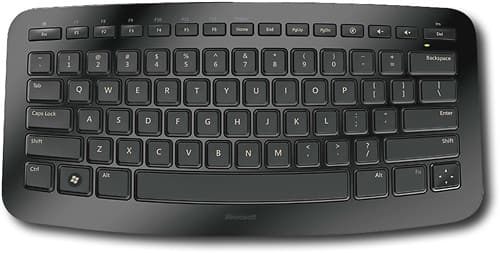
I'm trying to get myself on a daily writing routine, which has had mixed results so far. But if I'm going to take this seriously, ergonomics is something I should spend some time researching. Hell, even if I don't write a lot I spend so much time in front of a computer screen, I should pay a bit more tribute to getting my workspace right.
Concession one was that my screen should be at eye level, a bit of a problem when I'm using a tiny netbook to do most of my writing. But a wireless keyboard and any sort of box can fix that. (I also have a second solution which is working nicely in my bedroom, which is to use my television as my primary monitor, using it from across the room. I have to scale the font size way up, but looking say twenty feet away for extended periods of time is supposed to be easier on the eyes than looking say a foot away for similar amounts of time, so hopefully a screen eight feet away will be a little better as well. I'm not a doctor, a million doctors may be rolling their eyes at this right now, but it's not like my eyes have fallen out of their sockets or anything as a result either).
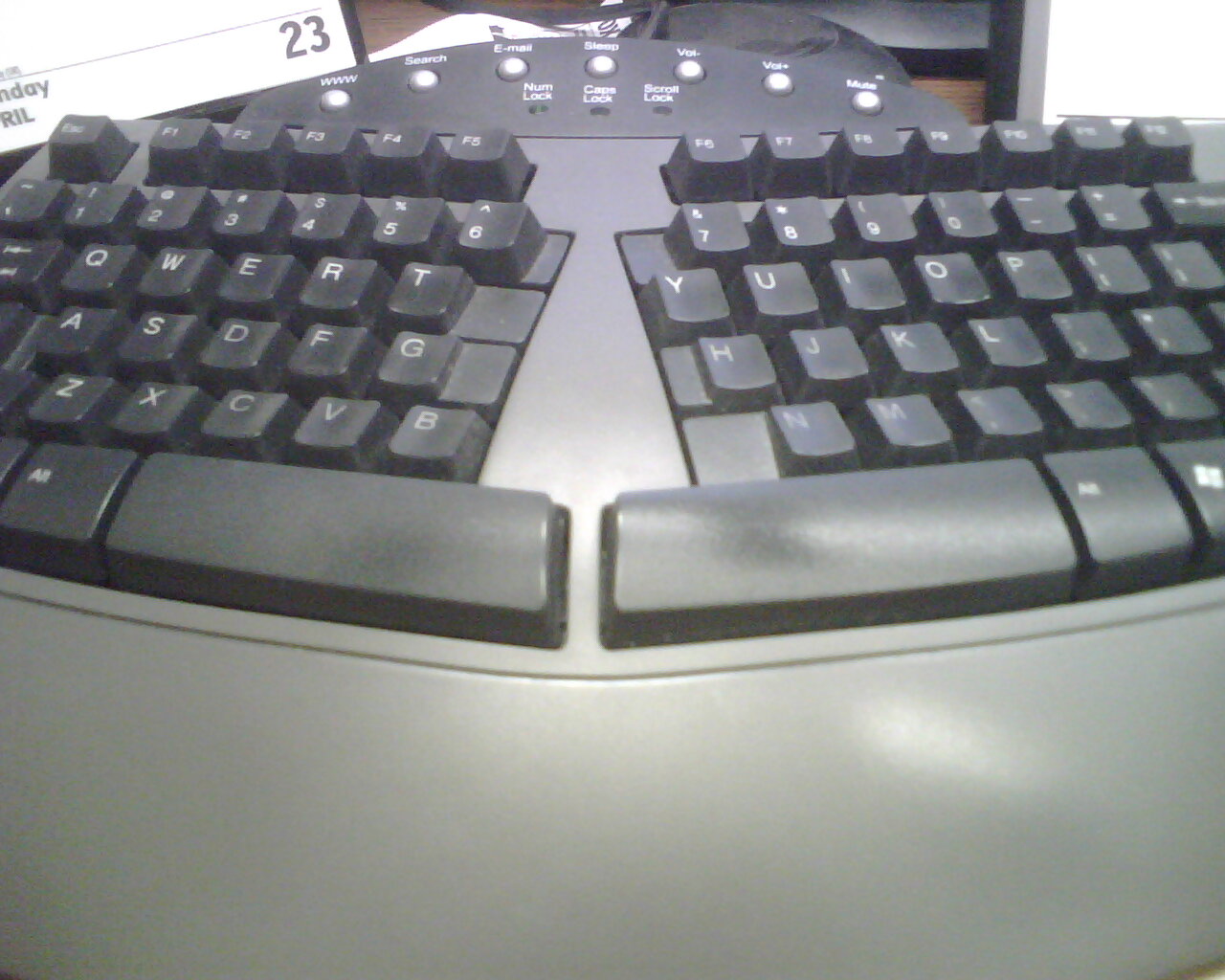
Okay, so I'm buying a keyboard, what keyboard? I'm not interested in those split super-ergonomic keyboards (see picture above - source). I've used them a little at work, not a fan. Honestly I feel like the biggest boon to my hands would be just making a point to type as gently as possible. Back when I wrote with a pen and paper like some kind of super-advanced caveman with access to advanced processing and mass production facilities, I noticed I wrote as if I thought the harder I clutched the pen the faster I would go. Not so. Buying better, smoother pens helped, but ultimately I had to keep reminding myself to go easier on my grip until I rewrote the habit.
Alternatively, I read one article on ergonomics that said just having multiple dissimilar keyboards that you switch between can help a lot. The type of injuries I'm trying to avoid here are repetitive stress injuries of course, and a bigger, smaller, or differently shaped keyboard could help reduce the repetition. So, want to know what kind of keyboard I bought? Spoiler alert, look at the title of this post!
I've been using the Microsoft Arc keyboard for a month now. Here is a random assortment of thoughts:
- It's wireless, but not Bluetooth? The lack of Bluetooth means 1) it uses an extra usb port, 2) I can't use it on my phone or tablet. 3) I'm fucked if I ever lose that dongle. Does Bluetooth have some engineering problems I'm unaware of? I'm pretty sure Bluetooth 4.0 makes it way easier to conform to their standards without paying for a license, or is that only for hobbyists?
- Bluetooth does have one downside for say streaming music as many devices don't have a dedicated Bluetooth chip, so using Bluetooth slows your wifi a bit, and using wifi can degrade your Bluetooth signal. That said, I doubt it applies too much to a keyboard, and even in music streaming it's a minor annoyance at best, I can always plug into a speaker's aux port if the data exchange is too vexing.
- Looking at the box, I just noticed it says that it works on Xbox too! Does that mean their refusal to use Bluetooth on the Xbox is why this keyboard isn't Bluetooth? If so, way to steer into a poor decision.
- It is not backlit, and the letters on the keys are off-white with a dull matte finish. Why? Why doesn't this shit ever end? And why me??? But seriously, why not use bright reflective white (yellow is better but might be annoying to some) letter decals out of the factory? Understand, I'm a touch-typist, largely. But I do look at the keyboard occasionally, and lower contrast keys make my mind pause for a second to discern my hand's proper position, even if my hands already know where they are. It's weird, but that's how it is. Even if they're not reflective, why in Great Scott's name are they dull grey? In the dimly lit room I'm typing in now it's really a bit of a strain to make them out. (I'm serious, not only is it a bit of a strain, it's really a bit. Not metaphorically, but really. A bit of a strain. So you know I'm drawing some lines in the mothereffing sand here).
- There are no separate directional keys, which I didn't notice at the time of purchase (I was more worried about the location of the CTRL key, which is in the right place, btw). There is a single four-way rocker key that acts as all four arrow keys. It's not as nice as dedicated keys, but it works, and smaller keyboards all make some sort of compromise to get all the keys we know and expect to fit in a uniform rectangle.
- There are also only six dedicated F-keys (F1-F6), the rest of the top row are Home, End, Page Up, Page Down, volume keys and Delete. You can use the Fn key to call up F7-F12 if you must. It doesn't affect my use in the slightest, F2 and F5 are the only two F-keys I really use.
- I don't know if the curved shape is easier on my hands or anything. I did notice I've been able to type quickly on it from the get go. And it is different from my other keyboards without being prohibitively so, so I think it fits the bill.
- All the keys cut off at a certain point if held down for too long. The arrow keys have about 159 "key sends" (according to my text editor) before cutting off and something like 129 sends for a random letter I just held down to test. I'm assuming they did some research and found the curved surface makes accidental presses more likely if you set the keyboard aside for a moment, or happen to set something like a magazine on it (on a flat keyboard the weight would be distributed equally over most of the keys, on this one some keys are naturally higher than the others). Doesn't matter too much, except the arrow keys cutting out are really annoying if you're trying to select a long bit of text, for example. Not a deal-breaker, but a minor annoyance.
- No adjustable angle. I know, most adjustable height tabs on keyboards are plastic and break really easily, they're mostly crap anyway and never seem to give enough angle. But being a human, I need to feel like I have at least a little bit of control over my environment, you know?

Above is a picture of my keyboard. I applied some reflective yellow stickers to increase the visibility of the keys. Note that this picture is taken with a flash, but it does highlight the difference between the stickers and the dull matte original labeling (which you can see on the top and bottom right corners of the keyboard). The original decals look okay in this picture, but consider the flash and the contrast ratio between the decal types. Imagine using this in low light. I wish manufacturers would realize that they don't even have to ship backlit keyboards, just make the key decals bright and reflective enough to be illuminated by a dim monitor. They really do make a difference.
I like the action, the keys are fairly quiet but springy. I might like a bit less resistance but that's probably because I'm more used to flimsy laptop keyboards. My real problem is the lack of Bluetooth---it means this device will stay at home when I travel, and a cheaper, backlit bluetooth keyboard will go with me, so I can break it out to continue work on my tablet if and when my laptop dies. A backlit bluetooth version of this keyboard would make me a rabid evangelist in spite of all other flaws, because the design and feel of this keyboard really is quite good.
By the way, another tip I saw on saving your hands if you type a lot, don't hit two keys with one hand. Yeah. So when you do CTRL+ something or SHIFT+something have one hand hit the Control or Shift keys and have your other do the other key, as I just didn't when typing them in caps. It's a hard habit to get into, because using the shift key is usually so fast I don't think about it until half a sentence later. Also, remember in your school's typing class how cool it was when you realized how many keys you could hit with one hand, or how far apart two keys could be and still be hit with one hand? Well I do, and apparently that was me flipping off the future. Conform to mediocrity, as I should have done! Conform! Also never do CTRL+ALT+DELETE unless you put a glass or something on the delete key, and don't spill your drink on the keyboard either. And don't sue me if you do. Also don't sue me if ergonomics ends up being less of a science than homeopathy.
Well heavens, my initiative to write more is working, look at all these words! Can you feel the power? Let me just make a note of this progress... Oh, it seems that on my list of activities, blog posts are considered to be borderline stalling and don't necessarily count as "productive behavior". Well isn't that just the shits? I blame you, Microsoft! And Google, you know what you've done!
Ok, I guess it's back to stalling in other online spaces.
-David
Subscribe to:
Posts (Atom)